
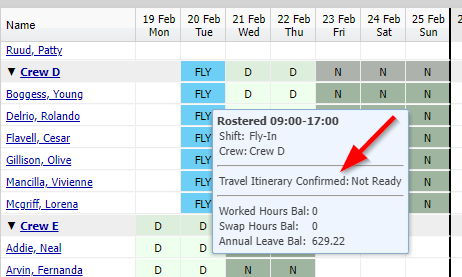
Once Operational Readiness is set up (here), the Operational Readiness Conditions (ORCs) for Workers are displayed on the Roster Administration page when showing the details of a cell by hovering the mouse over that cell.
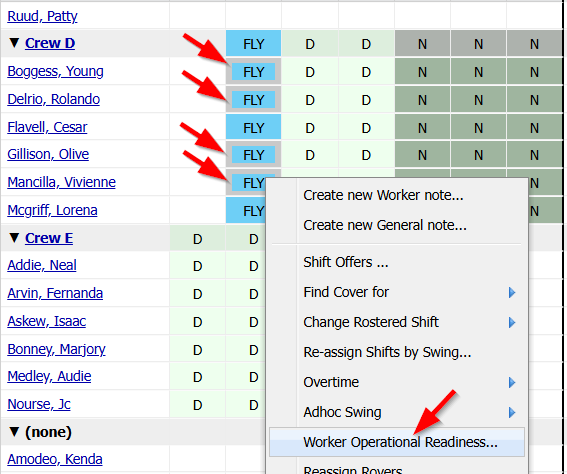
A right-click menu item is available to initiate updating the readiness value for the conditions for Workers. You are able to select one or more Workers to apply changes to.
A form is then shown in the working window to edit the values.
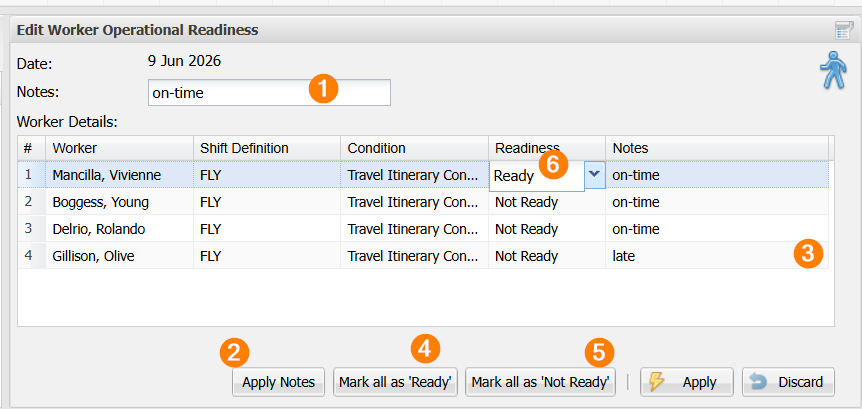
- You can enter universal Notes (1) and then click the "Apply Notes" button (2). This will apply the same note to all Workers on the form.
- You can also enter specific notes for individual Workers (3).
- You can mark all Workers as "Ready" or "Not Ready" (4 and 5).
- You can change the Readiness for individual Workers (6).