
ROSTERkey has several features that allow "Higher Duties"[1] to be assigned and reported.
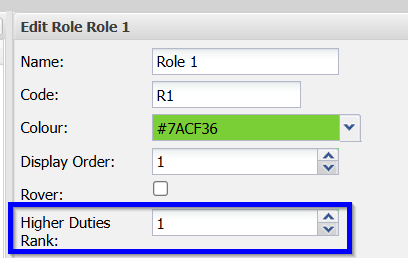
Firstly, set a positive "Higher Duties Rank" for those Roles which are to be considered in Higher Duties calculations. Having a value of 0 for the Rank will exclude that Role from comparisons. A rank of 1 is the lowest. This is set on the "Configuration -> Roster -> Role" page.
When Changing a Role for a Worker on a Shift, the "Higher Duties" flag will automatically update to reflect if the new Role is Higher Duties or not. If either the Worker's default Role or the new Role has a Higher Duties Rank of 0, the comparison will not be made.
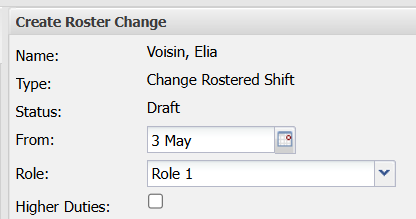 | 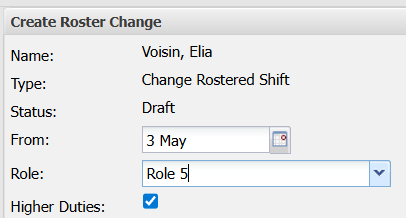 |
You are able to manually set the "Higher Duties" flag at any time.
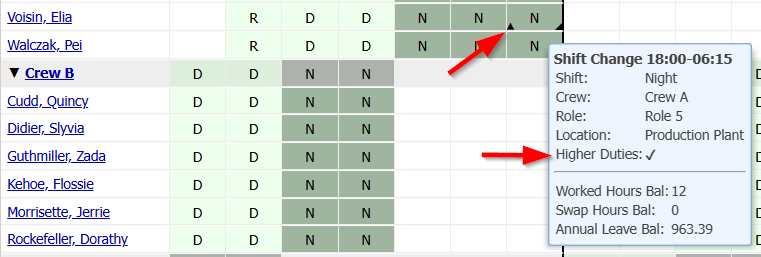
On the Roster Administration page, for a Worker that is on Higher Duties, there is a new indicator (upwards pointing arrow) in the lower left corner of the cell and the tooltip also shows the Worker as being on Higher Duties.
Additionally, in the Worker Allocation Report, there is a new column to indicate whether that task assignment is a Higher Duties assignment.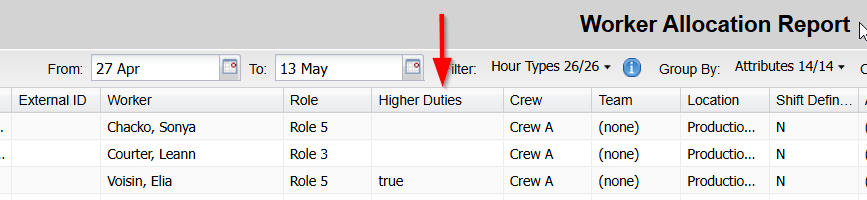
----
[1] "Higher Duties" is a free optional feature. To have it enabled contact your ROSTERkey support representative.