
ROSTERkey is able to check certain parameters relating to certain roster changes and if these parameters are not met, then raise an Alert, the Roster Change Approval Alert.
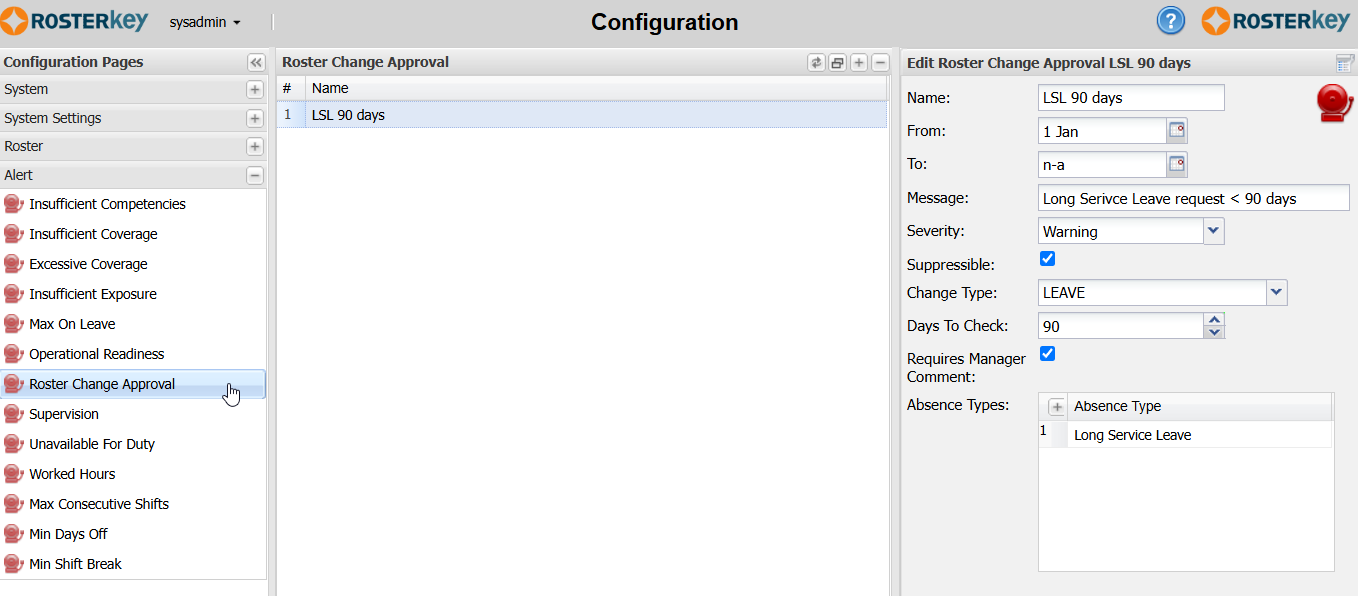
To configure a Roster Change Approval Alert:
- Set the usual Alert data: Name, From, To, Message, Severity, Suppressible.
- Select the "Change Type". Currently, this check is only available for LEAVE.
- Enter the "Days To Check". This is the number of days, prior to the date of the leave, that the leave record/request needs to be made. Otherwise the rule will be broken and an Alert raised.
- "Requires Manager Comment"
- If this is left unselected and the rule is broken, then an Alert will be created and can be managed as other normal Alerts.
- If you tick this box, then you will not be able to save a Leave record that breaks the rule without including a "Manager Comment" on the Leave. When you add a "Manager Comment" in this case, you can save the Leave and no Alert will be generated.