
Customisation
NB: ROSTERkey includes a standard out-of-the-box Staffing Sheet. If this Staffing Sheet doesn't mean your organisation's needs, contact a ROSTERkey specialist, or a consultant from Shiftwork Solutions - the staffing sheet can be tailored to suit your specific requirements.
The Staffing Sheet
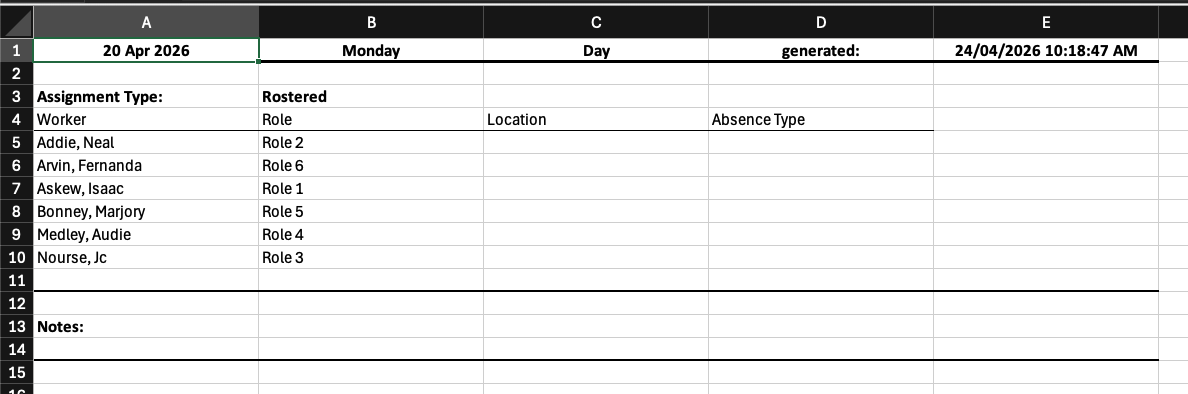
The Staffing Sheet is an Excel (.xlsx) report that shows worker allocations for a selected date range and department. It is downloaded directly from the Roster Administration page, if your organisation has Staffing Sheets available as an Additional Setting.
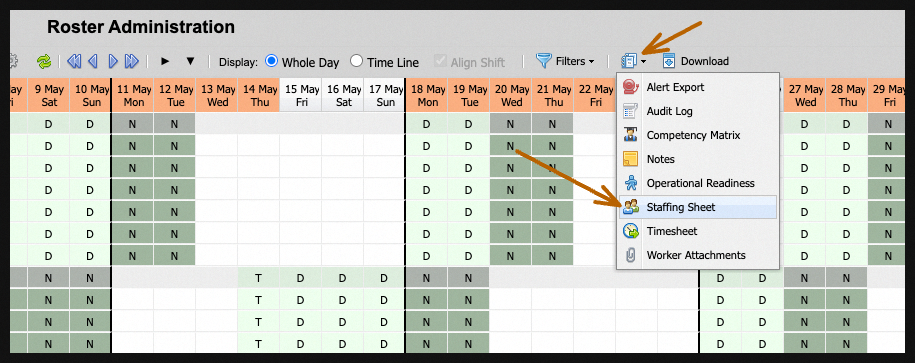
When the Staffing Sheet button is selected, the following popup appears: 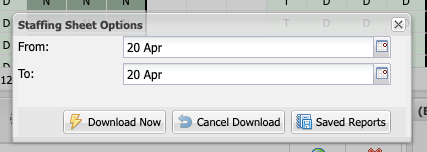
Staffing Sheets can be customised to show a range of dates, and can be downloaded on the spot if needed.
Out of the Box
The following screenshot shows ROSTERkey's out-of-the-box Staffing Sheet from a single day date range.
Saved Reports
Saved Reports allow you to schedule reports to be generated and delivered automatically. No need to manually download them each time.
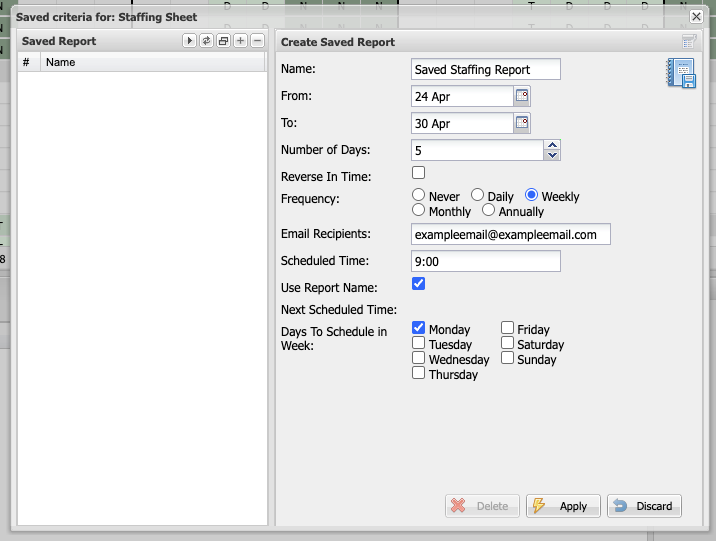
When creating a Saved Report you provide a name for the configuration as well as default values that will be applied to the report when it is run.
Different From/To/Number Of Days/Reverse In Time values will initiate different report date windows as follows. You can also indicate to reverse the dates
| From | To (inclusive) | Number of Days | Reverse In Time | Report Start Date | Report End Date (inclusive) |
| not provided | not provided | 0 or not provided | no | beginning of current month | end of current month |
| not provided | not provided | 0 or not provided | yes | beginning of previous month | end of previous month |
| not provided | not provided | > 0 | no | current day | current day + Number of Days - 1 |
| not provided | not provided | > 0 | yes | Number of Days before current day | day before current day |
| not provided | provided | 0 or not provided | N/A | beginning of month matching the To month | the provided To date |
| not provided | provided | > 0 | N/A | the provided To date less Number of Days | the provided To date |
| provided | not provided | 0 or not provided | no | the provided From date | end of month matching the From month |
| provided | not provided | 0 or not provided | yes | beginning of the month of the provided From date | the provided From date |
| provided | not provided | > 0 | no | the provided From date | the provided From date + Number of Days - 1 |
| provided | not provided | > 0 | yes | Number of Days before the provided From date | the provided From date |
| provided | provided | N/A | N/A | the provided From date | the provided To date |
How It Works
At the scheduled time, ROSTERkey generates the staffing report and emails a link to the nominated recipients. Reports are available as Excel (.xlsx) or CSV depending on report type.
If a report fails to generate, an email notification is sent to you and the ROSTERkey support team.